Easier to pick a level and follow your reviewsレベル選びと復習が、わかりやすくなりました
Each level now shows an Eiken guide, and auto-pronounce, undo and the word list got easier to use.レベルごとに英検の目安を出します。自動の発音や「ひとつ戻す」の場所など、使いやすさも見直しました。
 知ってる知らない?英単語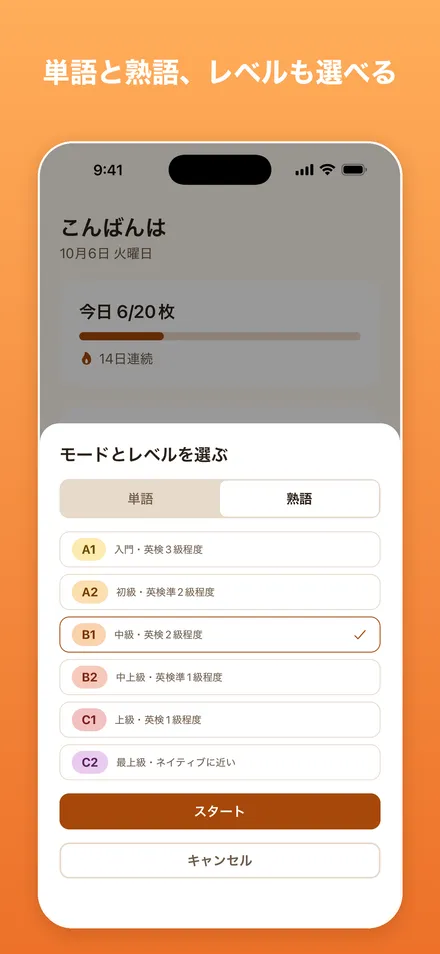
What’s new新しくなったところ
Eiken guide英検の目安
Each level shows an Eiken (英検) guide and a few typical words.各レベルに、英検の目安と代表的な単語を出します。
A 学習した tab「学習した」タブ
The word list has a new 学習した (studied) tab. Each tab explains itself and shows the right count.単語帳に「学習した」タブができました。タブごとの説明と、正しい単語数も出ます。
Reviews across levelsレベルを変えても復習
Words you missed still come back for review after you change level.知らなかった単語は、レベルを変えても復習に出てきます。
Auto-pronounce自動で発音
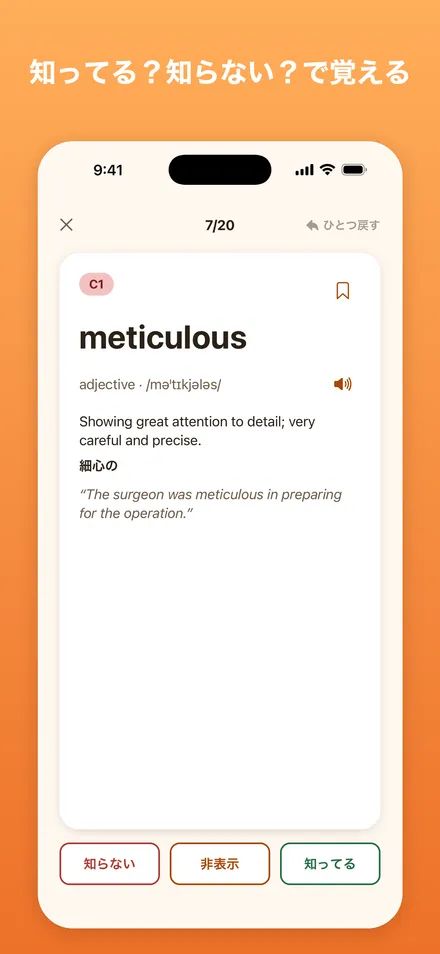
Cards can read the word aloud as they appear. Turn on 自動で発音 in Settings.カードが出たときに、単語を読み上げられます。設定の「自動で発音」です。
Undo at the top「ひとつ戻す」は上に
ひとつ戻す (undo your last answer) is now at the top of the screen.直前の答えを取り消す「ひとつ戻す」を、画面の上に移しました。
When a word comes back次の復習がわかる
A word’s details show its next review and how often you missed it. Settings has a new 学習のしくみ (how it works) page.単語の詳細に「次の復習」と「知らなかった回数」を出します。設定に「学習のしくみ」もできました。
 知ってる知らない?英単語Learn English words by instinct: swipe “know” or “don’t know”, and spaced repetition decides what to review next.知ってる?知らない?直感で答えるだけの英単語学習。About the app →アプリの紹介を見る →View on the App StoreApp Store で見る